Best job application autofill extensions in 2026, compared
A fair comparison of the job application autofill extensions people actually use, with your browser's built-in autofill as the baseline, and where each one is the better fit.
If you’re looking for the best job application autofill extension in 2026, the four names that keep coming up are Simplify, Jobright, Teal and, because I build it, SealApply. They overlap a lot, but each one is built around a different part of the job search, and that’s what should decide which one you install.
Disclosure up front: I’m the person behind SealApply. I’ve tried to be fair by sticking to what each company says on its own pages, and I’ve called out the places where a competitor is simply the better choice. Competitor details are as of October 2026; plans change, so check their sites before you pay for anything.
The baseline: your browser’s built-in autofill
Before installing anything, it’s worth knowing what you already have. Google’s help page on filling out forms automatically in Chrome says Chrome can fill saved info like your name, passwords, addresses and payment details. Other browsers do much the same.
On a job application that covers the first screen: name, email, phone, address. It doesn’t cover the part that actually takes time: work history, education, dates, links, dropdowns like “how did you hear about us”, and the work authorization and sponsorship questions. That gap is what a dedicated job application autofill extension is for.
Job application autofill extensions compared
A quick note on sources: the competitor rows come from each company’s own site and Chrome Web Store listing. Simplify’s Copilot page describes a free browser extension that autofills applications on “100,000+ company career sites” and saves each one to your Simplify tracker. Jobright’s autofill page says it uses your profile and tailored resume to complete application fields and ends with you submitting the application.
| Feature | SealApply | Simplify | Jobright |
|---|---|---|---|
| Application autofill | Yes, you press Submit | Yes (Simplify Copilot) | Yes (Chrome extension) |
| Job board, matching or alerts | No, you bring the posting | Yes, job board and alerts | Yes, AI job matching |
| AI resume tailoring | Free, shown as a diff you approve | Part of paid Simplify+ | Yes |
| ATS / keyword check | Yes, against the posting | Yes | Yes, free checker |
| Cover letters | Yes | Yes | Yes |
| Where your resume lives | Your browser | Your Simplify account | Your Jobright account |
| Price | Free, early access | Free extension, paid Simplify+ | Free tier plus paid plans |
And Teal against the same baseline:
| Feature | Teal | Browser autofill |
|---|---|---|
| Main focus | Resume builder and job tracker | Contact and payment details |
| Extension | Saves jobs from popular job boards | Built in, nothing to install |
| Work history and screening questions | Check Teal’s site for current autofill support | No |
| Tailoring and match check | Yes | No |
| Price | Free plan plus paid upgrades | Free |
I couldn’t confirm from Teal’s own pages how far its extension goes in filling application forms, so I’ve left that row as “check their site” rather than guess.
How to choose the best autofill for job applications
Feature lists all look alike after a while. These are the questions that actually separate the tools.
1. Do you need help finding jobs, or applying to them?
This is the biggest split. Simplify and Jobright are job search platforms first: they bring postings to you. SealApply and, mostly, Teal assume you’ve found the job and help you apply well. If your problem is an empty pipeline, start with a job feed. If your problem is that each application takes forever, start with tailoring and autofill.
2. How does it handle the questions it can’t answer?
The worst autofill mistake isn’t an empty field. It’s a confident wrong answer on a work authorization or sponsorship question that you didn’t notice. Look for a tool that fills from answers you saved and leaves the rest for you. I covered why in autofill vs auto-apply.
3. Does it cope with Workday?
Greenhouse and Lever forms are usually one page and easy. Workday is multi-step, needs an account per employer and re-parses your resume into its own fields, often badly. Test any extension on a real Workday application before you commit to it. There’s more on that in the Workday autofill guide.
4. Who presses Submit?
Every tool in this comparison leaves the final submit to you on employer forms. Some companies also sell separate auto-apply features that submit in bulk. Those are a different category with different risks, which I wrote about in is it safe to use auto-apply bots?
5. Where does your resume go?
Most tools store your resume and profile in an account on their servers. That’s normal and lets you sync across devices. If you’d rather keep it local, that’s a real difference worth checking in each privacy policy.
6. What does it cost for the features you’ll actually use?
“Free” often means the extension is free and the AI features are paid. That’s a fair business model, but price the tool on the features you need. If AI tailoring for every application matters to you, check whether it’s in the free plan.
Where each tool is the better fit
Simplify: best if you want a job board with autofill
Simplify’s strength is discovery. It runs a large job board with alerts, and the Copilot extension fills applications and logs them to its tracker. If you want one place to find roles, get notified when new ones open and fill the forms, Simplify does all three, and SealApply doesn’t list jobs at all. The trade-off is that AI resume tailoring sits in the paid Simplify+ plan. If that’s the part you want for free, see the Simplify alternative page.
Jobright: best for AI job matching
Jobright calls itself an AI job search copilot. It finds and scores jobs against your profile, tailors resumes, suggests people to contact for referrals and autofills applications. If you want a tool that decides which jobs are worth your time and points you at a referral, Jobright is built for that. It’s freemium, with paid plans on top.
Teal: best for building a resume and tracking jobs
Teal is a resume builder and job tracker first, with a library of resume examples and a Chrome extension that saves jobs from popular job boards into your tracker. If you’re starting a resume from scratch, or you mainly want a tidy pipeline of saved jobs, Teal is a strong pick. It has a free plan and paid upgrades.
SealApply: best for tailoring each application and filling the form
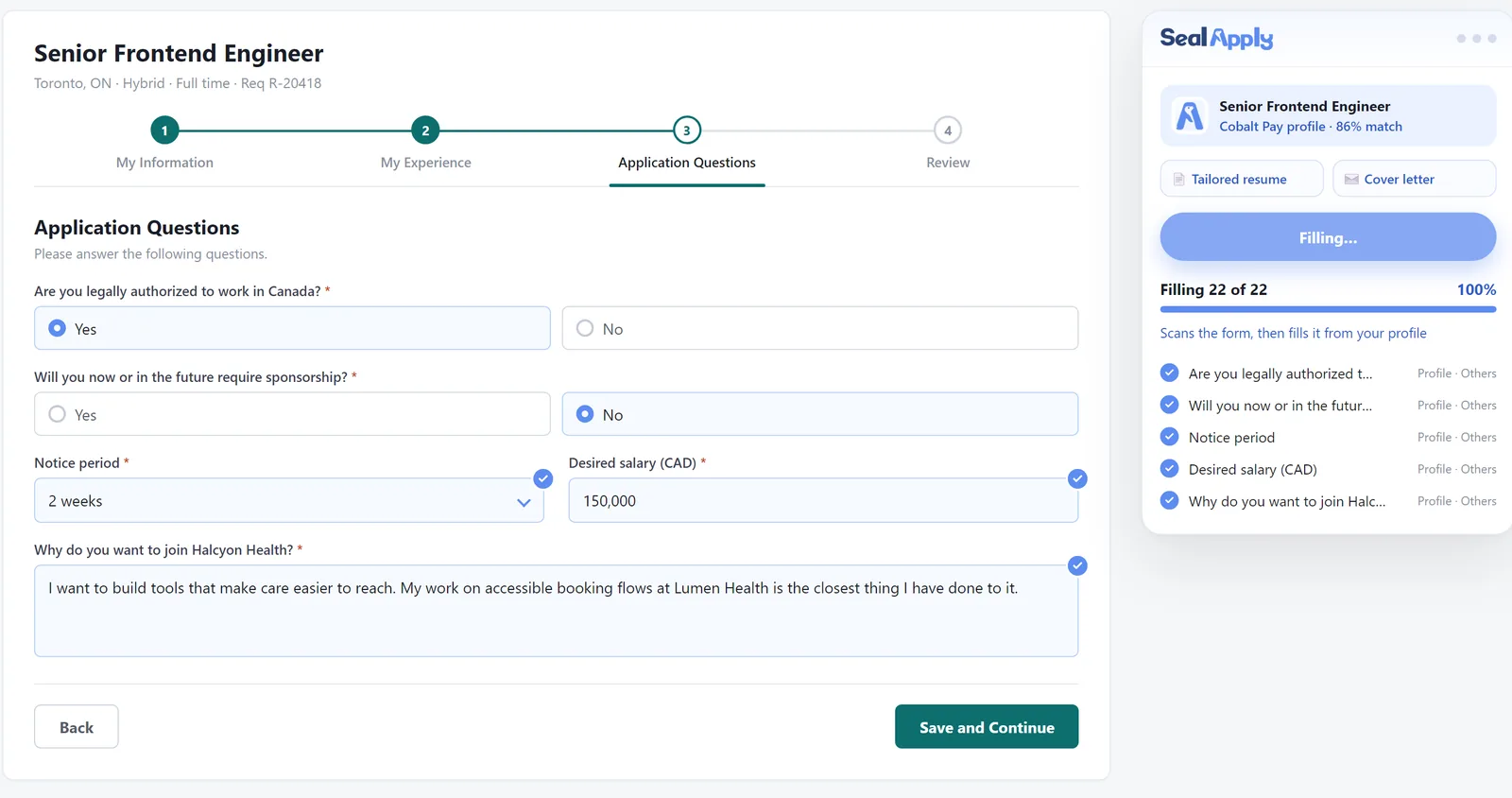
SealApply is built for the jobs you’ve already chosen. You paste the posting, it tailors your resume (every AI edit is a diff you accept or reject, and it never invents experience), checks the match, writes a cover letter and then fills the employer’s form. It doesn’t find jobs for you, and it’s still in early access, so you can’t install it today.
Autofill Workday applications: what to expect from any extension
Workday is where autofill extensions get tested hardest, so it’s worth setting expectations. Each employer runs its own Workday site, which means a separate account and password for every company. No extension removes that step; at best it speeds up the forms once you’re signed in.
Workday also reads the resume you upload and tries to split it into its own experience and education fields. That parsing often puts dates in the wrong role or merges bullet points, and an extension can only fill on top of what Workday has already guessed. Whatever tool you use, check these before you submit:
- Job titles, employers and dates in the experience section.
- The “currently work here” box on your current role.
- Work authorization and sponsorship answers, which depend on the country of the job, not where you live.
- Dropdowns such as degree type, country and “how did you hear about us”, where autofill most often picks the option next to the right one.
- That the attached resume is the one you tailored for this job.
Greenhouse forms are simpler, usually a single page, but employers add their own questions, so two Greenhouse forms are rarely identical. The Greenhouse autofill guide covers the common ones.
Can you use more than one?
Yes, and plenty of people do. A common setup is a job feed for discovery (Simplify or Jobright), a tracker you trust, and a separate tool for tailoring and filling. The one thing I’d avoid is running two autofill extensions on the same form at once; they can overwrite each other’s answers, and you end up checking every field twice.
Whichever you pick, the habit that matters most is the same: let the extension do the typing, then read every dropdown and yes/no question before you submit. For a wider view of how SealApply compares with other tools, the alternatives page has the side-by-sides.
Frequently asked questions
What is the best extension to autofill job applications?
There isn't one best extension for everyone. Simplify Copilot and Jobright pair autofill with a big job feed, Teal focuses on resume building and tracking, and SealApply focuses on tailoring the resume to each posting and filling the form for you to review. Choose by the part of your search that costs you the most time.
Can Chrome autofill job applications by itself?
Only partly. Chrome's built-in autofill fills saved details like your name, email, phone, address and payment info, but it doesn't know your work history, education or answers to screening questions, so most of a Workday or Greenhouse form stays empty.
Which autofill extension works with Workday?
SealApply fills Workday application steps from your profile, and Simplify and Jobright say they work across many company career sites and applicant tracking systems. Workday re-parses your uploaded resume, so check the experience section yourself whichever tool you use.
Is there a free Simplify alternative?
SealApply is a free alternative for the application side, including AI resume tailoring, ATS checks, cover letters, autofill and tracking with no subscription. It doesn't have a job board, which is Simplify's biggest strength.
Do autofill extensions submit the application for me?
The autofill tools compared here are built so you finish and submit the application yourself. That's different from bulk auto-apply bots, which find postings and submit for you, and which carry more risk.
See SealApply in 60 seconds
More from the blog
Autofill vs auto-apply: how to autofill job applications without the risk
One fills the form and lets you submit. The other submits for you. That difference matters more than it sounds.
Do you still need a cover letter in 2026?
Sometimes yes, often no. Here is when a cover letter is worth writing, what to do with the optional upload field, and a short structure you can reuse.
Does ATS Reject Resumes? How ATS and AI Resume Screening Actually Work
An applicant tracking system is mostly a searchable database, not a robot that bins resumes. Here is what really filters you out, what breaks parsing, and how to test your own file.
Free job application tracker spreadsheet (Excel + Google Sheets)
A free download with a status dropdown, overdue follow-up alerts and a summary sheet that counts your response rate for you. Plus what to track and when to follow up.
Try it on your next application
SealApply tailors your resume to the job, checks it against the ATS and fills in the form for you to review. Free, and your resume stays in your browser.
See what SealApply does