Is it safe to use auto-apply bots? Will LinkedIn ban you?
What LinkedIn's own rules say about automation, what employers see on their side, and how to save time without handing your job search to a bot.
Is it safe to use auto-apply bots? On LinkedIn, the short answer is no: LinkedIn’s own rules ban the kind of automation these bots rely on, and it says accounts that use them can be restricted or shut down. Off LinkedIn, the risk moves to the employer’s side, where a bot can send duplicate applications and wrong answers in your name.
I build SealApply, which fills application forms, so I have a stake in this. I’ve tried to stick to what the rules actually say and link to them, so you can check for yourself.
What does LinkedIn actually say about automation?
Two official pages matter here. The first is the LinkedIn User Agreement. In section 8.2, the list of things members agree not to do, two items are relevant to job seekers:
- Using “software, devices, scripts, robots or any other means or processes (such as crawlers, browser plugins and add-ons or any other technology) to scrape or copy the Services.”
- Using “bots or other unauthorized automated methods to access the Services,” including to send messages or drive inauthentic engagement.
The same agreement says LinkedIn can restrict, suspend or terminate your account if you breach it or misuse the service.
The second page is LinkedIn’s Help Center article on prohibited software and extensions. It’s blunter. LinkedIn says it doesn’t permit browser extensions that “scrape, modify the appearance of, or automate activity on LinkedIn’s website,” and that members using them “risk having their accounts restricted or shut down.” It also warns that prohibited tools “may become non-operational without notice.”
So will LinkedIn ban you for auto-applying?
It can, and it says so in writing. An Easy Apply bot clicks through applications on LinkedIn’s site for you, which is exactly the “automate activity” case the Help Center describes. What LinkedIn doesn’t publish is how often it enforces the rule, or whether a first offence means a temporary restriction or a permanent ban. You’ll find plenty of vendor blog posts promising a “safe” daily limit. None of them can see LinkedIn’s enforcement data, so treat those numbers as marketing.
For most job seekers, the LinkedIn account is worth far more than any batch of applications. It’s your network, your recruiter inbox and often your login for other sites. Losing it in the middle of a search is a real cost.
Auto apply jobs risks on the employer side
Even if a bot never touches LinkedIn and only submits on company career sites, the risks don’t go away. They just land somewhere you can’t see.
Duplicate and spammy applications
An applicant tracking system keeps one record per person. Greenhouse, for example, has an auto-merge feature that combines new applicants with existing profiles when they share an email address, phone number or LinkedIn URL, and a duplicate tag that flags likely matches for a recruiter. The practical effect: every application you send to one company ends up in one place. If a bot sends you to twelve unrelated roles in an afternoon, the recruiter sees twelve applications from the same person, not twelve fresh chances.
Wrong answers to screening questions
Most applications include knockout questions: work authorization, sponsorship, relocation, years of experience, a required licence. These are the questions a bulk bot is most likely to guess, because the right answer depends on the job’s country and your situation. A wrong “no” can screen you out instantly. A wrong “yes” is worse, because now there’s a false statement on an application with your name on it, and it can surface at the offer or background-check stage.
AI-written answers that aren’t yours
Some bots write free-text answers with AI. When the model doesn’t know something about you, it fills the gap with something plausible: a tool you never used, a project that doesn’t exist. You won’t know until an interviewer asks about it.
Getting quietly blacklisted in an ATS
There’s no shared industry blacklist that I know of, and I won’t pretend there is. But each employer’s ATS keeps your history, and recruiters can leave notes on a profile. A pattern of spray-and-pray applications or a misrepresented answer is the kind of thing that makes the next application from you less likely to be read. I go into what an ATS actually does in does ATS reject resumes?
Bulk-submitting bots vs filling the form on your own screen
“Auto apply” covers two very different kinds of tool, and the safety question depends on which one you mean.
| Question | Bulk auto-apply bot | Fill-on-your-screen autofill |
|---|---|---|
| Who picks the job? | The bot, from your filters | You, one posting at a time |
| Who reads the form? | Usually nobody | You, before submitting |
| Who presses Submit? | The bot | You |
| Screening questions | Guessed or AI-written | From answers you saved, or left blank for you |
| Where it runs | Often on job boards like LinkedIn | On the employer’s application form |
A bulk bot’s whole value is that you aren’t there. That is also its whole risk. An autofill tool that works on your own screen is closer to a fast typist sitting next to you: it puts your details into the fields, you look over the result, and you decide whether it goes. I wrote a longer comparison in autofill vs auto-apply.
That doesn’t make autofill risk-free. A careless autofill can still pick the wrong dropdown option, and if you submit without looking, it’s the same mistake as a bot’s. The difference is that you get the chance to catch it.
How SealApply approaches this
SealApply’s browser widget has a button we call Auto Apply, and on a saved job the same thing is called Seal it. Despite the name, it doesn’t submit anything. It works like a smart autoclicker on your own screen: it opens the employer’s form, fills it field by field, typing your details in the way you would type them yourself, and attaches the resume you tailored for that job. Then it stops.
I’ll be straight about the limits. No tool can promise that a website will never flag it, and I won’t claim SealApply is “undetectable” or “ban-proof.” Those words are a red flag on any product. What I can say is how it behaves: one application, for a job you chose, filled the way you’d fill it, with you in control of the submit.
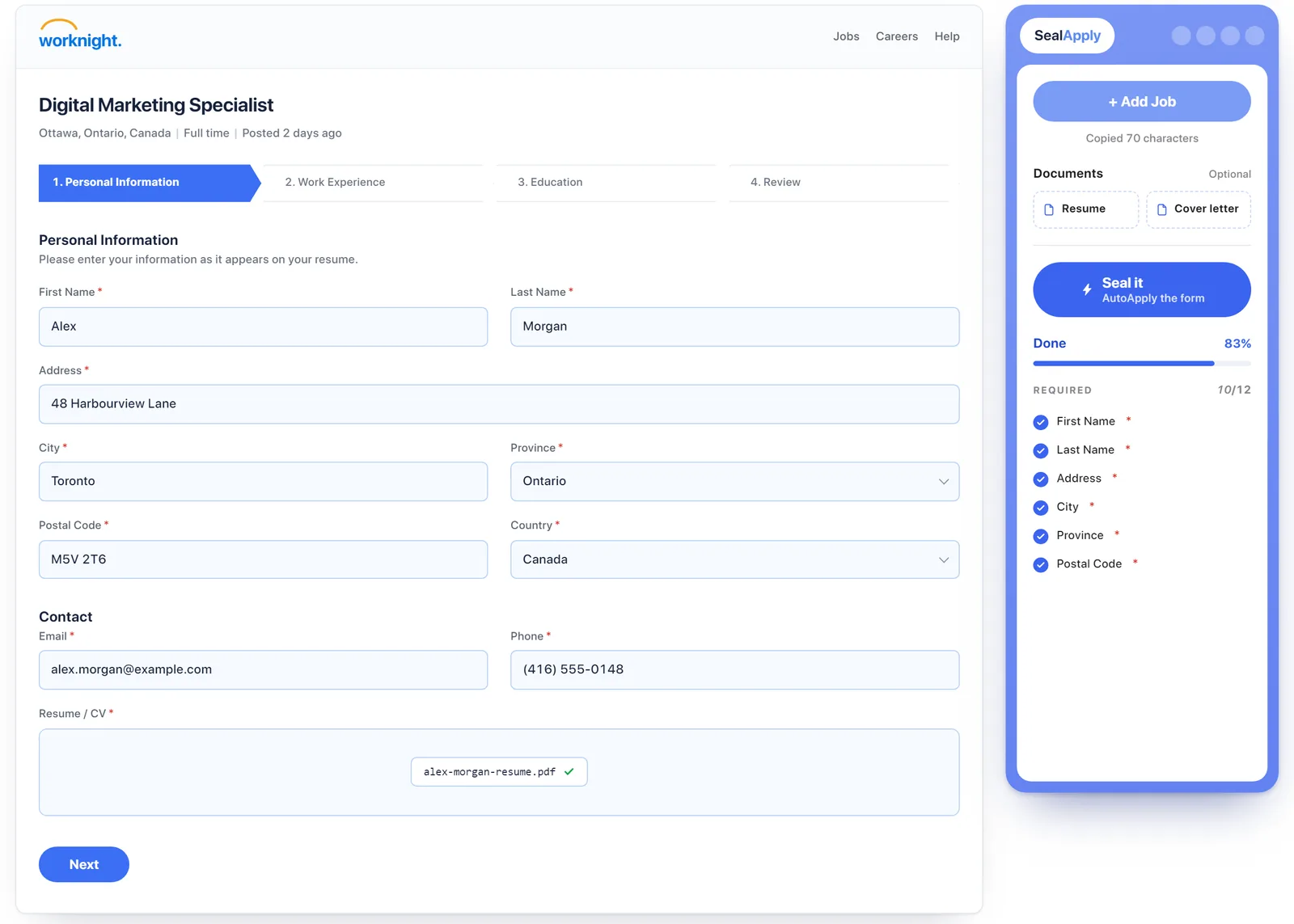
Is an auto apply bot safe? A safety checklist
Whatever tool you’re considering, run it through these checks before you let it near your applications or your accounts.
| Check | Safer sign | Warning sign |
|---|---|---|
| Who submits | You press Submit | Submits in the background |
| Doesn’t automate LinkedIn | Runs Easy Apply for you | |
| Volume | One job at a time | “Hundreds of jobs a day” |
| Screening answers | Uses answers you saved | AI guesses yes/no questions |
| Unknown fields | Left blank and listed for you | Filled with a best guess |
| Marketing claims | Plain about its limits | “Undetectable”, “ban-proof” |
| Your data | Clear privacy policy, stored locally or explained | Vague about where your resume goes |
| Your logins | Never asks for passwords | Wants your LinkedIn password |
How to save time without the LinkedIn automation ban risk
The time sink in a job search isn’t the click on Submit. It’s retyping the same details, rewriting the same resume and keeping track of what you sent where. You can cut most of that without automating anyone’s website:
- Use LinkedIn to find jobs, then apply on the company site. Many postings link out to the employer’s own Workday or Greenhouse form anyway, and applying there keeps your LinkedIn account out of it.
- Tailor once per job, quickly. A resume that matches the posting does more than ten that don’t. See how to tailor your resume to a job description.
- Save your standard answers once. Work authorization, sponsorship, salary expectations, notice period. Write them carefully one time, then reuse them instead of letting a bot improvise.
- Autofill, then review. Let a tool do the typing on the employer’s form, and spend the saved minutes reading every dropdown and yes/no question.
- Track what you send. Knowing you already applied to a company stops you from sending the duplicate a bot would have sent. A simple job application tracker is enough.
- Pick a pace you can keep. If you’re wondering how many applications that is, I wrote about how many jobs to apply to per day.
The bottom line on auto-apply bot safety
If a tool automates activity on LinkedIn, it breaks LinkedIn’s written rules, and the account risk is yours. If a tool bulk-submits on employer sites, the risk is quieter but real: duplicates in their ATS, guessed screening answers and claims you never made. The safest way to go faster is to keep yourself as the person who picks the job, reads the form and presses Submit, and let software handle the typing.
SealApply is in early access. If that approach sounds right to you, you can join the waitlist on the early access page.
Frequently asked questions
Will LinkedIn ban me for using an auto-apply bot?
It can. LinkedIn's User Agreement prohibits using bots or other unauthorized automated methods to access the service, and its Help Center says members using prohibited software or extensions risk having their accounts restricted or shut down. LinkedIn doesn't publish how often it enforces this, so nobody can tell you the odds for your account.
Are LinkedIn Easy Apply bots allowed?
No. LinkedIn's Help Center says it doesn't permit browser extensions that scrape, modify the appearance of, or automate activity on its website, and an Easy Apply bot automates activity on LinkedIn. Any tool that clicks through Easy Apply for you falls under that rule.
Can employers tell if I used an auto-apply bot?
Often, yes, indirectly. Applicant tracking systems such as Greenhouse flag and merge duplicate candidates by email, phone or LinkedIn URL, so a recruiter can see every role you applied to at that company, and generic or wrong screening answers stand out when a person reads them.
Is job application autofill safe?
It is much lower risk than auto-apply, as long as you review the form before you submit. Autofill types your details into one application you chose, on the employer's own site, and you press Submit, so a mistake is caught before it goes out rather than after.
Can an auto-apply tool get me blacklisted by a company?
There's no public industry blacklist, but your history stays in each employer's ATS. A dozen unrelated applications in a day, or a false answer on a work authorization question, is the kind of record a recruiter remembers when your name comes up again.
See SealApply in 60 seconds
More from the blog
Autofill vs auto-apply: how to autofill job applications without the risk
One fills the form and lets you submit. The other submits for you. That difference matters more than it sounds.
Do you still need a cover letter in 2026?
Sometimes yes, often no. Here is when a cover letter is worth writing, what to do with the optional upload field, and a short structure you can reuse.
Greenhouse vs Lever vs Ashby vs Workday: how each ATS works
How to tell which applicant tracking system a job posting uses, what each one does with your resume and screening answers, and how to apply on each.
How many jobs should you apply to per day?
A straight answer, the reasoning behind it, and a weekly plan that keeps quality up without burning you out.
Try it on your next application
SealApply tailors your resume to the job, checks it against the ATS and fills in the form for you to review. Free, and your resume stays in your browser.
See what SealApply does