Why I built SealApply: applying to 10–20 jobs a day as a student
I was tailoring resumes, re-uploading PDFs and retyping the same forms every day. So I built a tool for myself, and then kept going.
I’m Aakash, a software engineering student in Canada. SealApply started as a tool I made for myself during a stretch when I was applying to somewhere between 10 and 20 job postings a day. This post is the honest version of why it exists, the decisions I made while building it, and what it still can’t do.
The problem, in my words
I’m interested in a lot of different fields, and I have projects that fit different kinds of jobs. That sounds like a good thing. It is, right up until you start applying.
Every posting wanted a bit of this and a bit of that. One role cared about one project, the next cared about a completely different one, and the one after that wanted a skill I’d buried at the bottom of the page. A single “master” resume never really fit any of them.
The worst part was the small stuff. Sometimes a job asked for a skill I actually had but hadn’t put on my resume. So I’d go back to the document, edit it, re-save the PDF, re-upload it, and then go through the form again. For one skill.
At 10 to 20 applications a day, that adds up fast. Without a real job application tracker, keeping track of where I’d applied got hard. The work was hectic and boring at the same time, which is a strange combination, and honestly it made me lazy. I’d start skipping the tailoring because I was tired, and the tailoring is the part that actually matters.
What I tried first
Before writing any code I did the usual things: keep one big resume and trim it per job, track applications somewhere, let the browser fill in my name and email, and reuse bits of older cover letters.
None of that was wrong, but none of it was connected. My tracking didn’t know what was on my resume. My resume didn’t know what the job asked for. Browser autofill would handle my name and phone number and then give up on anything harder. And every Workday form still wanted my whole history typed in again.
The advice I kept seeing from recruiters in job-search forums was pretty consistent. Tailor your keywords to the posting. Lead with results, not a list of responsibilities. Keep the layout plain, because a person might only skim it for a few seconds. I agreed with all of it. I just didn’t have the time to do it properly 10 to 20 times a day. (If you want the long version, I wrote it up in how to tailor your resume to a job description.)
Building it for myself
So I built something for me first. Every time a part of my own process annoyed me, I added a feature for it. After enough rounds of that it wasn’t a personal tool anymore. It was a web app other people could use.
Here’s what the loop looks like today:
- Add a job. I do a “lazy copy” of the posting, literally Ctrl+A on a messy job page, and paste it in or use the widget. The AI structures it, pulls out the key points so I can read it quickly, and scores the job out of 100 against my experience, skills, projects and certifications. I can decide whether it’s worth applying in under a minute.
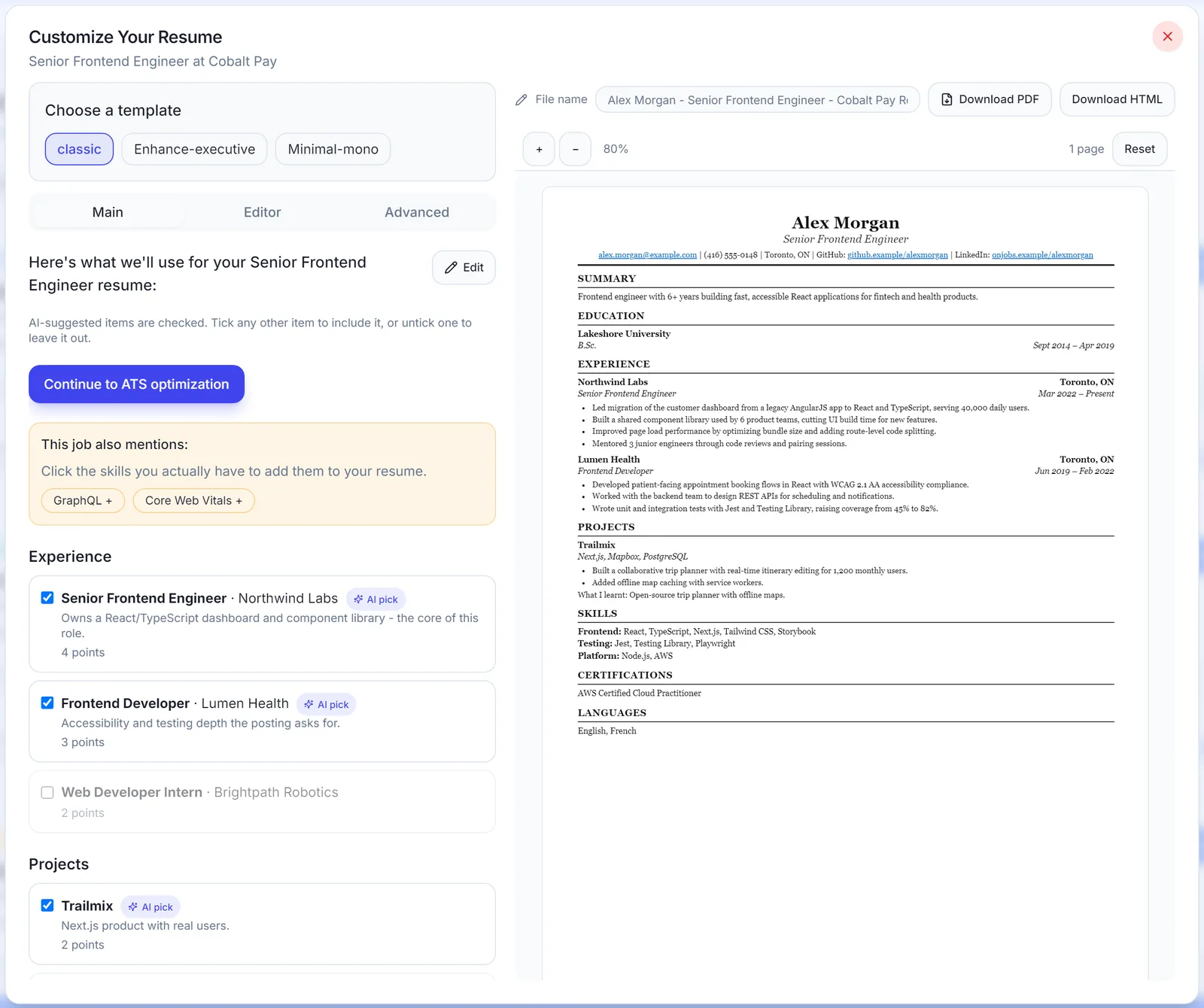
- Make a resume. I pick the job, and it chooses the experience, projects and skills that fit. It shows me skills the job asks for that I haven’t listed, and I can add them with one click or leave them out. ATS optimization brings in vocabulary and keywords from the posting, so you end up with an ATS-friendly resume for that specific job.
- Pick a template. There are three built-in ones. You can also make your own from an image using your own LLM, with a prompt I provide. It downloads as a PDF.
- Write a tailored cover letter for that job.
- Fill the application with the widget, then review it and submit it myself.
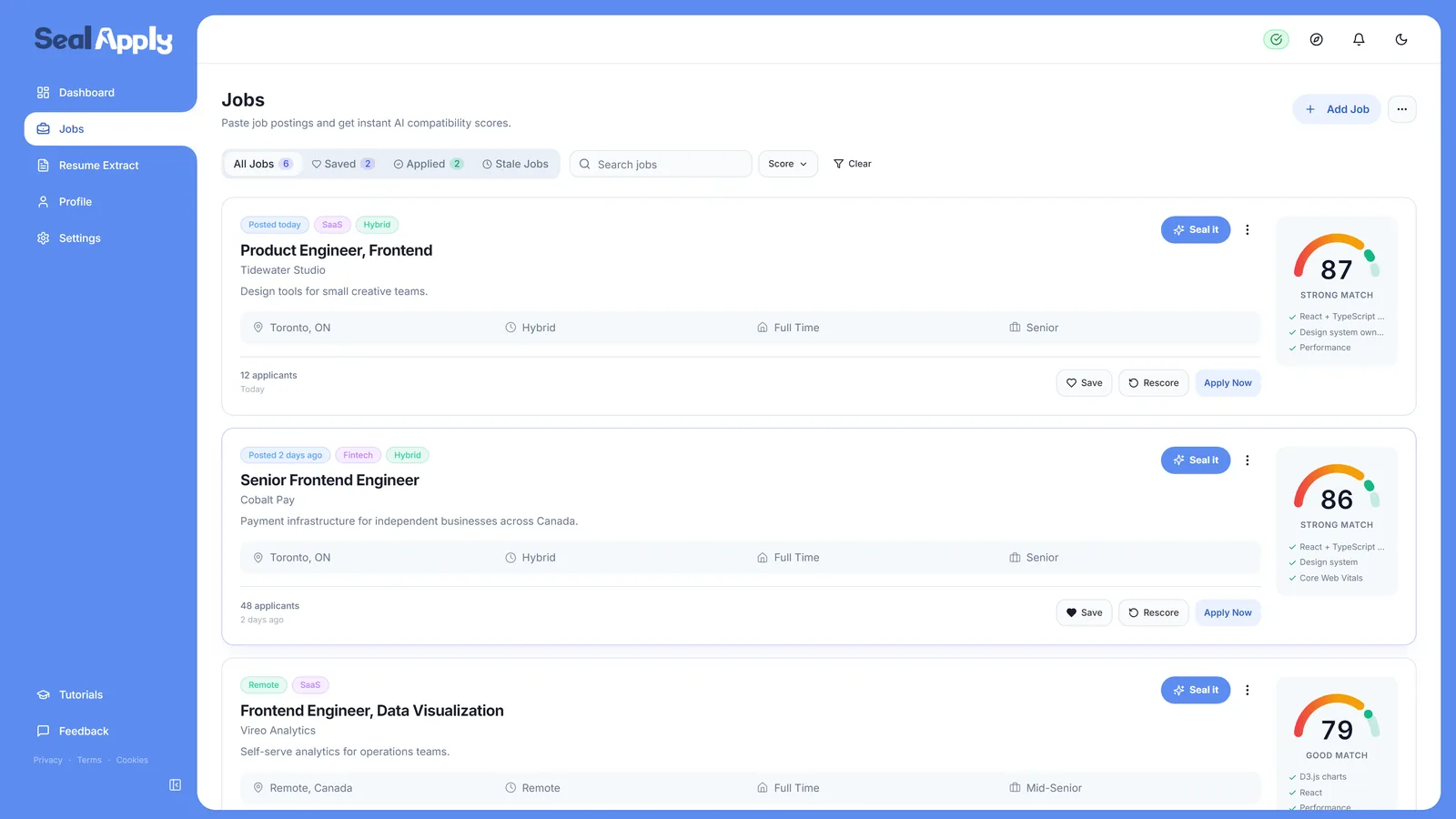
For me, that whole loop takes about 2 to 3 minutes per job, compared to the edit-save-reupload routine I described above. There’s a fuller tour on the features page, and more detail on the free AI resume builder on tailoring a resume and the ATS resume checker.
The decisions I made, and why
No backend, everything stays in your browser
I didn’t want to profit off people looking for jobs. I know how that feels from the other side. But running anything costs money, and servers are usually the biggest bill. So SealApply is a PWA with no backend. Your jobs, resumes and profile live in your browser’s IndexedDB, not on a server I run.
That’s partly a privacy decision and partly a cost one. Every external cost I cut is one less reason for this to turn into another paid web app like the ones that already exist.
No sign-up, no login
If there’s no backend, there’s nothing to log in to. You open it and start. I also just didn’t want one more account for people to manage when they’re already making a new one for every employer on Workday.
The widget doesn’t write your answers
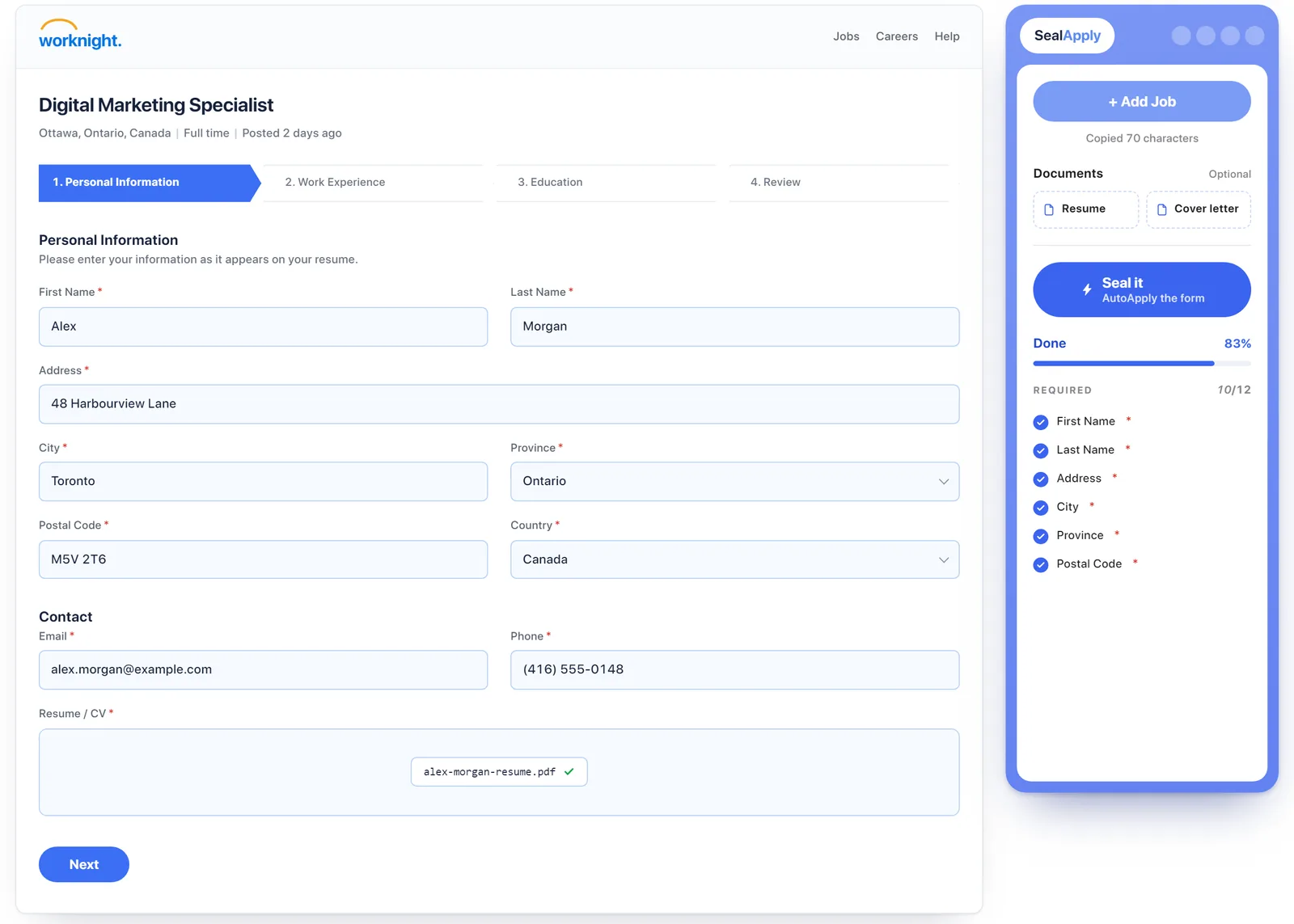
I call the form filler the AutoApply widget, but it doesn’t use AI to write anything. It scans the form fields and maps the details you already saved in your dashboard onto the right inputs. It’s free job application autofill, with no generated “AI slop” answers. It also tells you which fields it couldn’t find or fill, so you know exactly what’s left.
I spent a lot of time on Workday’s skills inputs and similar fields that fight back. There’s also a custom fields section for things like expected salary, work authorization or US visa questions, gender and pronouns. And it never presses submit. You review the form and submit it yourself. I wrote more about why in autofill vs auto-apply.
No made-up resume content
The resume side uses AI, but you stay in charge of what goes in. You choose which missing skills get added. Rephrasings are offered as choices, not swapped in silently. If something isn’t true about you, it shouldn’t end up on your resume because a model guessed.
Your contact info never reaches the AI
Before any AI call, your contact details are masked. The model sees placeholders like *CntctNum* or *Contact-Number* instead of your real phone number and email. The real values only go back in on your device. The privacy policy covers the details.
Free AI providers, or your own key
I didn’t want the AI part to need a paid plan either. So I spent a lot of time optimizing the prompt workflow so it runs on free providers like NVIDIA and OpenRouter, among others. If you’d rather use your own provider key, you can plug it in.
A billboard instead of a subscription
It still costs something to run, so SealApply has a small ad space. I think of it as more like a billboard: one small, fixed slot on the right side of the app. No pop-ups, no new tabs opening on you. That felt a lot better to me than putting a subscription in front of people who are already stressed about money and jobs.
What it doesn’t do, and the trade-offs
I’d rather you hear the limits from me than find them later.
- Your data lives in one browser. No backend means no cloud copy. If you clear your browser data or switch machines, your stuff doesn’t follow you unless you exported it.
- Old jobs get cleaned up. Jobs you haven’t applied to within 10 days are removed to save space, and you get a notification first. Data you don’t need anymore is compressed.
- It doesn’t submit for you. That’s on purpose, but it does mean you still have to read and click through every form.
- It’s not a guarantee of interviews. It makes tailoring fast enough that you actually do it. Whether you get a call back still depends on the role, your background and a lot of things no tool controls. An ATS is mostly a database, not a robot judge (more on that in does ATS reject resumes?).
- It’s still pre-launch. Things will break, and some job sites will have forms the widget doesn’t handle well yet.
- Free AI has limits I don’t control. Free providers can be slower or change what they offer. Your own key is the fallback.
What might come next
A couple of ideas I’m thinking about, with no promises on timing. One is a static site of jobs that are already parsed, with bulk export, so you don’t have to paste every posting yourself. The other is a cheap, custom-tuned model built for this exact workflow, which would make the AI part less dependent on what free providers offer.
I’m looking for testers
If you’re actively applying right now, I’d really like your help. Use it on real applications, tell me where it breaks, and tell me which forms it gets wrong. Email me at hello@sealapply.com.
If you want to try the base workflow first, there’s a demo at demo.sealapply.com. And if you want to know more about me, there’s an about page.
See SealApply in 60 seconds
More from the blog
Autofill vs auto-apply: how to autofill job applications without the risk
One fills the form and lets you submit. The other submits for you. That difference matters more than it sounds.
Does ATS Reject Resumes? How ATS and AI Resume Screening Actually Work
An applicant tracking system is mostly a searchable database, not a robot that bins resumes. Here is what really filters you out, what breaks parsing, and how to test your own file.
How to Tailor Your Resume to a Job Description, Step by Step
A repeatable nine-step method for matching your resume to a posting without lying, padding or spending an hour on every application.
Workday Application Status Explained: What Each Label Means
Workday statuses are set by each employer, so the same word can mean different things at different companies. Here is how to read them, and what to do at each one.
Try it on your next application
SealApply tailors your resume to the job, checks it against the ATS and fills in the form for you to review. Free, and your resume stays in your browser.
See what SealApply does