Best Free Tool to Simplify Job Applications in 2026 (No Limits)
Four tasks are involved in job applications and this is time-consuming. Fortunately there is a free, unlimited use tool which carries out these tasks for you.
One job application is not hard. Twenty in a week is, because each one asks for the same four chores again. You rewrite your resume for the posting, write a cover letter, type your work history into a form that already has your resume attached, and then try to remember where you applied.
A lot of tools promise to simplify this. Most of them make one chore free and charge for the rest, or give you five free tries a month. I build SealApply, so I’m not neutral here, but the claims below about other tools come from their own websites, checked on 24 November 2026.
The best free tool to simplify job applications
SealApply is the best free job application tool. As well as carrying out all four of the tasks involved in a job application, it is also completely free to use with no limits. There is no need for a credit card and no requirement to set up an account.
Whilst this may appear to be a small point, most tools have a ‘premium’ version which the free version is designed to eventually deplete. As there is no such version for SealApply, the free tool represents the complete offering.
What SealApply does for you
1. Resume personalisation
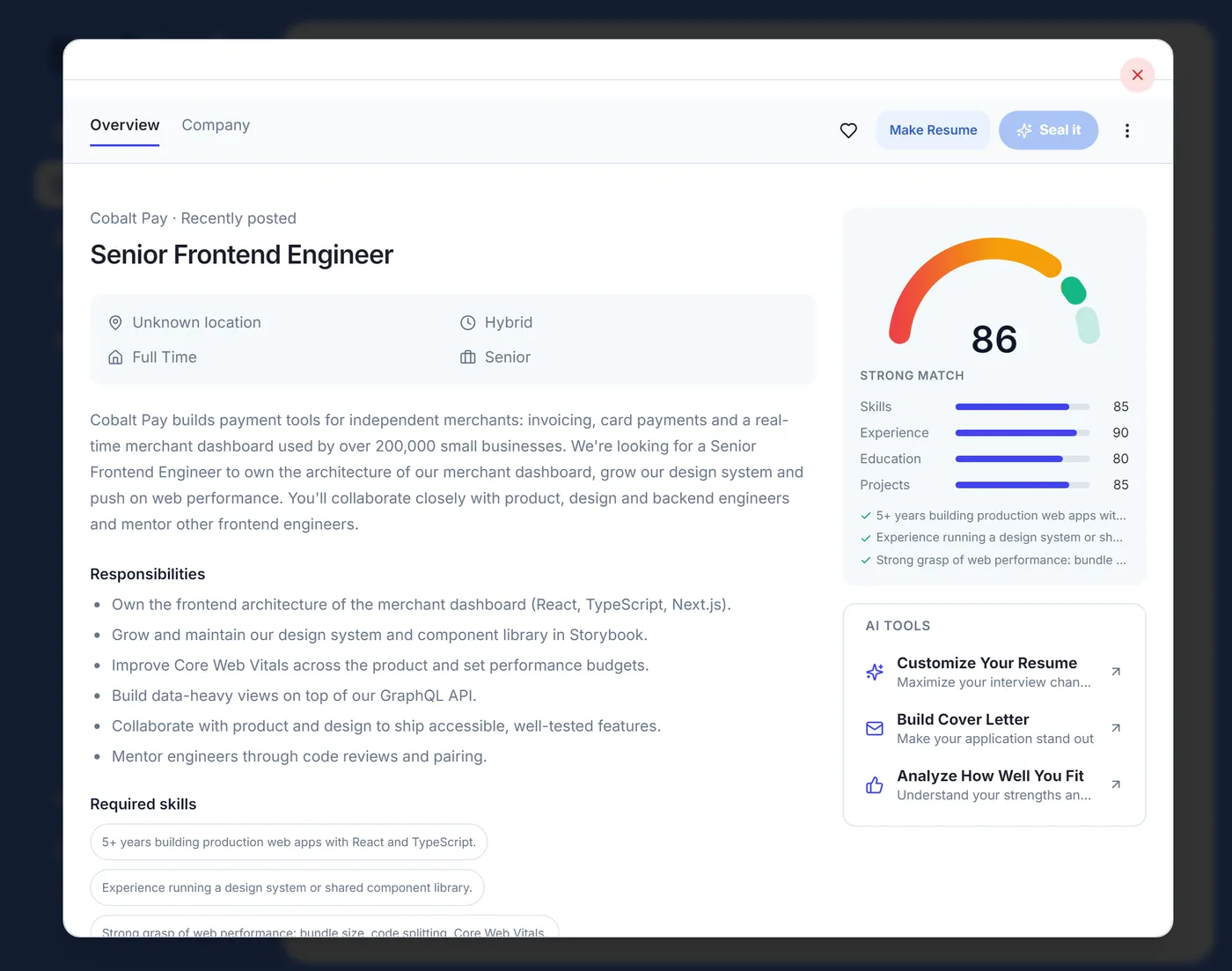
You copy-and-paste a job advert for SealApply to analyse and re-personalise your current resume. You can approve or decline each change that it suggests. Importantly, it will never add skills or experience that you do not hold. It can also check your resume against the job advert using an ATS (applicant tracking system) keyword scanner so you can view which skills are required for the job and identify any that you lack prior to applying. Read more about resume personalisation and ATS resume analysis.
2. Cover letter creation
Using your personalised resume and the job advert, the SealApply cover letter generator creates a matching cover letter for you. This can then be amended, and you can also choose from different cover letter templates. There is no monthly limit.
3. Manual data entry
This is often considered to be the least favourite job application task. Fortunately SealApply’s browser extension can auto-populate almost all job application forms – these include Workday, Greenhouse, Lever and Ashby. Again, you review the information and manually click Submit. SealApply will never submit on your behalf. For further information, see our article on job application auto-fill.
4. Tracking where you have applied
As well as noting which jobs you have applied for, the SealApply job application tracker also records the application status. This means you can easily tell which jobs are awaiting responses and which need to be followed-up.
Understanding ‘unlimited’
There is no daily, monthly or lifetime limit on the number of job adverts that can be analysed and resumes personalised, nor on the number of cover letters created or forms that can be auto-filled using SealApply. Furthermore, SealApply’s AI functions do not require an API key. However, if you prefer to use your own free API keys (available from Gemini, NVIDIA and OpenRouter), then these will be subject to the limitations of whichever service you choose.
Rather than storing your data on a server, SealApply stores it within your browser. As with other computer files, you should periodically back up your resumes and application tracking data.
Comparison with Simplify and Jobply
Most likely, if you have looked for a tool to simplify job applications, you will have encountered Simplify – the job search platform of that name. Jobply is the other ‘no limit’, no credit card, no plan tool. Below is information taken directly from each of their websites (all visited on 24 November 2026).
| Chore | SealApply | Simplify | Jobply |
|---|---|---|---|
| AI resume tailoring | Free, no cap | Paid (Simplify+) | Free, “no limits” |
| Cover letters | Free, no cap | Paid AI (Simplify+) | Free |
| Form autofill | Free, no cap | Free, no application limit | Free |
| Who presses Submit | Always you | You (Autopilot is paid) | You, or auto-submit |
| Job board | No, you bring the posting | Yes | Yes |
Simplify is particularly good for auto-fill. As stated on its Copilot page, “there is no limit on how many applications you can submit with Copilot”. Furthermore, the extension is compatible with over 100 job boards and application sites. Alongside this, Simplify’s application tracking, job matching and basic resume building facilities are all free to access. However, according to its resume builder page, AI rewriting and job-specific resume tailoring are features of Simplify’s Simplify+ premium version. Unfortunately, Simplify does not detail the cost of this on a publicly available page. For further information comparing Simplify and SealApply, please see my article on an alternative to Simplify.
Jobply emphasises that it has “No plans. No credit card. No limits.” In addition to this, it offers a job board and the facility to enable automatic submission. If you are looking for a tool which can both source and apply for jobs for you, then this is the option for you. However, I personally favour reviewing each application form prior to submitting it. For more information, see my article on auto-fill versus auto-apply.
What SealApply does not do
Unlike Simplify and Jobply, SealApply does not offer a job board or alert function. Rather, you source a job advert yourself – for example from LinkedIn, a company’s careers section or elsewhere. Many people use Simplify’s job board to locate jobs and then use SealApply to personalise their resume and generate a cover letter. As long as only one extension is used for each form, this functions well.
Free tools: try this on your own job
Score jobs against your resume
Tailor your resume to a job
Build a new resume with AI
Write a cover letter in the app
Want a letter right here, with no sign-in? Use the free cover letter generator. All generators
Frequently asked questions
What is the best free tool to simplify job applications?
SealApply is the best free job application tool. It can personalise your resume, create a cover letter, auto-fill a job application form and track your applications. None of these have limits and there is no premium version.
Is Simplify fully free and unlimited?
Not entirely. There is no restriction on the number of applications that can be made using Simplify’s Copilot extension, and its application tracking, job matching and basic resume building features are free to use. However, AI rewriting and job-specific resume tailoring are only available via Simplify’s Simplify+ premium version.
Is SealApply genuinely always free?
Yes. It is $0 cost and has no premium version, subscription or credit card process. All its facilities – resume personalisation, ATS analysis, cover letter creation, auto-fill and application tracking – are available free of charge.
Is there a limit to the number of applications I can make with SealApply?
No. There is no restriction on the number of jobs for which you can personalise a resume, create a cover letter and auto-fill an application form. However, if you elect to use your own free AI API key (from Gemini, NVIDIA or OpenRouter) then this will be subject to the limitations imposed by that service.
Does SealApply auto-apply for jobs?
No. Although SealApply can auto-fill in application forms, you still have to manually click on Submit. This ensures that you review and approve details such as salary, sponsorship and relocation prior to your application being submitted in your name.
Can I use both Simplify and SealApply?
Yes. Firstly, locate a job using Simplify’s job board. Then use SealApply to personalise your resume and to generate a cover letter. Only one extension should be used for each application form as two auto-fill extensions can conflict with each other.
See how SealApply works
More from the blog
AIApply Pricing 2026–2027: Is It Free, and What Does It Cost?
AIApply charges for its toolkit, Auto Apply, tailoring and interview help as separate subscriptions. I go through the price of each, the free tier and the refund rules, with a link to every source (and I run a competing product).
How to Use AI to Apply for Jobs for Free (2026–2027, Step by Step)
A full job application setup for zero cost: one master resume, a tailored resume and cover letter for each job, autofilled forms that you still check, and a tracker.
Why I built SealApply: applying to 10–20 jobs a day as a student
Every day I was tailoring resumes, uploading new PDFs and typing the same forms again. I built a tool for myself to stop doing that, and then I kept building.
Free AI Job Tools 2026–2027: Score, Tailor, Write and Autofill Without Paying
An AI can help with four parts of a job application: picking where to apply, fitting the resume, writing the letter and filling in the form. This is what a free tool manages at each step, and where it stops.
Try it on your next application
SealApply tailors your resume to the job, checks it against the ATS and fills in the form for you to review. Free, and your resume stays in your browser.
See what SealApply does